

Description
Download Aasaan - Hindi Typing Tutor – Hindi Typing, Touch Typing, Keyboard Training, Learning Tool
Overview
Aasaan - Hindi Typing Tutor is a mobile application developed by CK Technologies, designed to assist users in mastering touch typing through structured, language-optimized lessons. The app targets individuals seeking to improve their typing proficiency, particularly those with limited access to formal typing education or those who wish to learn in their native language. With a focus on efficiency, the app promises foundational touch typing skills within 6 to 10 hours of practice, making it ideal for students, professionals, and language learners aiming to enhance digital communication. Its dual-language support—offering lessons in both English and Hindi—caters to a diverse user base across India and Hindi-speaking regions worldwide. The app is especially valuable in bridging the digital literacy gap for non-English speakers who rely on Hindi for daily communication. By integrating keyboard training with language-specific layouts, Aasaan supports learners who use Devanagari script, ensuring accurate input and improved typing speed over time. The software is positioned as a practical utility within the education category, addressing a growing need for accessible, localized learning tools in mobile environments. Although the developer did not provide additional technical details, the app’s purpose remains clear: to deliver an effective, self-paced typing curriculum through a streamlined and intuitive platform. Real-world use cases include students preparing for exams, office workers managing documentation, and individuals engaging in online correspondence.
Key Features & Functionality
- Quick Learning Process: The app enables users to acquire basic touch typing skills in 6 to 10 hours, depending on individual pace. This structured timeline helps learners set achievable goals and track progress efficiently.
- Dual-Language Lessons: Users can choose between English and Hindi lessons, allowing for language-specific training. This feature supports both linguistic and script-based learning, particularly beneficial for Devanagari users.
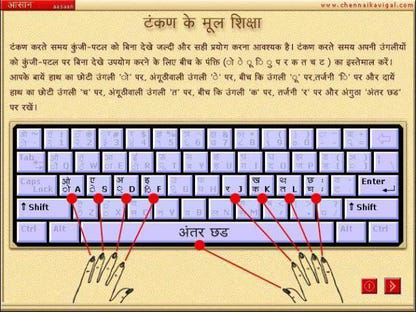
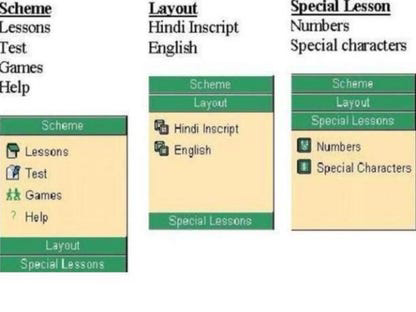
- Support for Two Keyboard Types: The app accommodates two distinct keyboard layouts, accommodating different user preferences and regional typing conventions. This flexibility ensures compatibility with various input methods and enhances usability across devices.
- Intuitive User Interface: Designed with simplicity in mind, the interface allows users to navigate lessons without confusion. The layout prioritizes clarity and ease of access, minimizing distractions during practice sessions.
- Regular Updates: Version 1 includes unspecified updates, reflecting the developer’s ongoing commitment to improving functionality and user experience. This suggests a dynamic development approach, even at initial release.
Each feature serves a practical purpose. For example, the dual-language option allows a Hindi-speaking student to type in their native script without relying on transliteration, improving accuracy and confidence. Similarly, keyboard type support ensures that users accustomed to specific layouts—such as INSCRIPT or QWERTY—can train effectively without adaptation stress. The time-bound learning model encourages consistent daily practice, which is crucial for muscle memory development. The app’s focus on self-paced progression makes it suitable for users with varying schedules and learning speeds.
Interface, UX & Performance
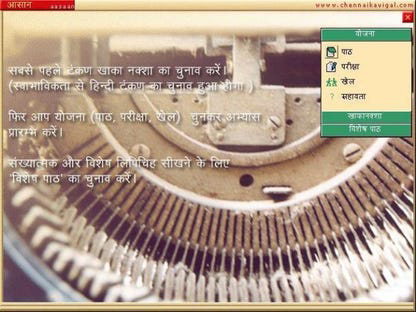
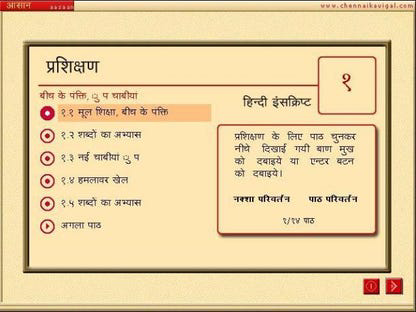
The user interface of Aasaan - Hindi Typing Tutor is designed with accessibility and clarity as core principles. The layout emphasizes a clean, minimalistic approach, with lesson navigation, progress tracking, and input feedback presented in a straightforward manner. Visual cues and layout consistency help users focus on typing accuracy and speed without being overwhelmed by complex menus. Navigation appears to follow a logical flow: users select a language, choose a keyboard type, and begin lessons sequentially, with immediate feedback on performance. Although the developer did not list formal performance metrics, the app’s lightweight size of 25.6 MB suggests optimized resource usage, likely contributing to smooth operation on mid-range Android devices. Responsiveness is expected to be consistent, given the app’s focus on real-time typing evaluation. Stability across different device categories cannot be confirmed, as compatibility information was not fully disclosed. However, the app’s design philosophy implies a commitment to reliability during core training sessions. Users can expect minimal lag during typing exercises, especially on devices with sufficient RAM and processing power. The absence of intrusive ads or excessive animations further supports a distraction-free learning environment. Overall, the UX is aligned with educational software best practices, prioritizing functionality over visual flair.
Platform Compatibility & Technical Requirements
Aasaan - Hindi Typing Tutor is available exclusively on the Android platform. The current version is 1.0, with a file size of 25.6 MB, indicating a lightweight and efficient installation. The developer did not specify minimum OS requirements or device compatibility details. As such, users are advised to check the app’s availability on their device’s app store for confirmation. The app’s size suggests it is optimized for devices with limited storage, making it accessible to users on budget and mid-tier smartphones. Since the app is free to download and install, it lowers the barrier to entry for learners across various economic backgrounds. The release date of March 15, 2024, indicates that the app is newly launched, positioning it as a fresh entry in the education category. While no information was provided about future updates or long-term maintenance, the inclusion of unspecified updates in the initial release suggests ongoing development. Compatibility with future Android versions remains unconfirmed, but the app’s lightweight nature increases the likelihood of broad device support.
Pros and Cons
Pros
- Free to download and use, reducing financial barriers to learning.
- Supports both English and Hindi language lessons, enhancing accessibility for diverse users.
- Offers training for two keyboard types, accommodating different regional input preferences.
- Designed with a simple, intuitive interface suitable for all skill levels.
- Focuses on rapid skill acquisition, promising foundational typing proficiency within 6–10 hours.
Cons
- Specific technical requirements were not listed, limiting clarity on device compatibility.
- Performance on older or low-end devices was not confirmed.
- Developer did not provide details on progress tracking or offline functionality.
- Information about advanced lessons or certification was not disclosed.
- Updates are mentioned but not detailed, leaving users uncertain about future improvements.
FAQ
Is Aasaan - Hindi Typing Tutor safe to download and use?
Yes, the app is available through official Android channels and is free from known malware. As a newly released educational tool, it adheres to standard security practices for apps in the education category.
Can I use this app without an internet connection?
The app’s offline capabilities were not specified. While many similar learning tools support offline use, users should verify functionality based on their device and app version.
Is the app compatible with all Android devices?
Compatibility information was not fully disclosed. The app’s lightweight size suggests broad support, but users should check their device’s app store for confirmation.
Are there any in-app purchases or ads?
The app is listed as free with no mention of in-app purchases or advertisements. However, the developer did not provide a detailed monetization model.
How often are updates released?
Version 1 includes unspecified updates, indicating ongoing development. The frequency of future updates has not been disclosed.
Final Thoughts
Aasaan - Hindi Typing Tutor stands out as a practical, accessible solution for individuals aiming to develop touch typing skills in Hindi or English. Its dual-language approach, support for multiple keyboard layouts, and user-friendly design make it a strong contender in the education space. The app’s focus on rapid learning aligns with modern demands for efficient skill acquisition, especially in digital-first environments. While some technical details remain unconfirmed, the app’s lightweight nature and free availability enhance its appeal. It is particularly beneficial for students, job seekers, and non-English speakers who rely on Hindi for digital communication. By offering a structured, self-paced curriculum, Aasaan provides a valuable tool for improving productivity and digital literacy. For anyone seeking to learn typing efficiently and affordably, this app delivers clear value. Download Aasaan - Hindi Typing Tutor now.
Guides & Tutorials for Aasaan - Hindi Typing Tutor
How to install Aasaan - Hindi Typing Tutor
- Click the Preview / Download button above.
- Once redirected, accept the terms and click Install.
- Wait for the Aasaan - Hindi Typing Tutor download to finish on your device.
How to use Aasaan - Hindi Typing Tutor
This software is primarily used for its core features described above. Open the app after installation to explore its capabilities.
User Reviews for Aasaan - Hindi Typing Tutor 0
No reviews found


